
An introduction to scrollytelling
Why interactive scroll-based storytelling works...
...and how to make it work for you.
Start scrollytelling with Shorthand
It's the fastest way to publish beautifully engaging digital magazines, reports, internal comms, and more.
What is scrollytelling anyway?
And why does it matter?
'Scrollytelling' was a term first coined to describe online longform stories characterised by audio, video and animation effects triggered by simply scrolling the page. The scrollytelling format represented a departure from basic stories containing little or no multimedia, and also from interactive stories that were complex to navigate.
One of the first examples of the style to gain widespread attention was Snow Fall: The Avalanche at Tunnel Creek, published by The New York Times.
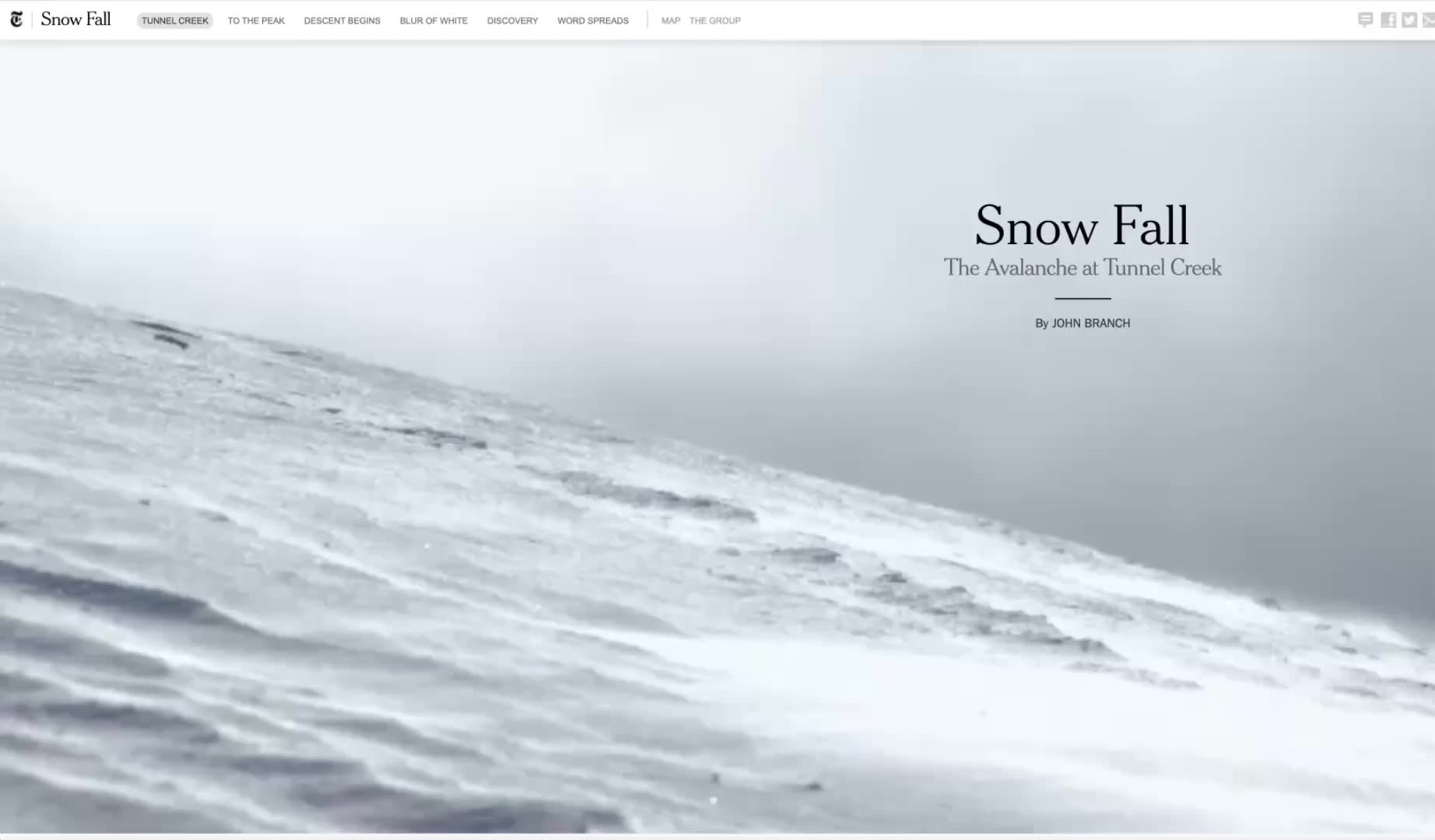
The simplicity of the scroll-based interaction meant that readers didn't have to second guess what to press, click, or swipe in order to read the full story. The scrollytelling format also provided novel opportunities for position-triggered multimedia events, such as video playing, animation, and image transitions. This enabled a dynamic interplay of text, imagery, and sound that gave the story an engaging rhythm and provided elements of unexpected surprise as components came to life.
The accolades and reader metrics proved that audiences loved scrollytelling stories: spending longer with them, reading further, and sharing more. Editorial teams discovered new uses for the style as well. The reader engagement stats and highly visual presentation made it a compelling proposition for brand partnerships and native advertising.
Corporate users loved applying this interactive treatment to their content, too, as it elevated information in a way that had not been possible with static PDF reports — and it also proved a more accessible format than PowerPoint or Keynote presentations. Read more in our guide on the limitations of PDFs.
Producing stories that felt special and visually engaging, however, was expensive and labour-intensive. Each interactive article could require months of work from a team of software engineers, designers, data journalists, and writers. That meant the technique was reserved for only the biggest stories by the biggest publishers, and was out of the question when tight deadlines mattered.
Scrollytelling was engaging, flexible, and looked great — but the cost and production time had to come down before it could reach a bigger audience.
Shorthand and accessible no-code storytelling
Shorthand was created with the express purpose of lowering the barrier to entry for interactive storytelling. It enabled faster and more affordable production of scrollytelling stories, without the need to involve big teams, or to write a single line of code. The launch of the Shorthand editor in 2014 meant the format was finally accessible and affordable not just to big publishers — though Shorthand counts many of the world's largest and most respected publishers among its ardent users — but also, with the rise of interactive marketing, to nonprofits, universities, corporates, and brands.
The shift from slow and expensive hand-coding to fast and easy creation didn't come at the cost of reader engagement. In our research study on interactivity and engagement, stories using scrollytelling sections like Chart, Scrollmation, Scrollpoints, and Reveal, achieved high average engagement scores.
Stories using scrollytelling sections achieved high engagement scores in our analysis.
Today, scrollytelling is used to tell all manner of powerful, experiential stories, using leading web design techniques to provide fully responsive rendering across desktops, laptops, tablets and phones.
While this type of story could be coded from scratch — or possibly built with tools like Ceros, Foleon, or Webflow, given enough time, web design resources, and training — each of the following examples was created by editors, writers, and/or digital producers using the drag-and-drop features of Shorthand, designed specifically for interactive news journalism and brand journalism.
By their very nature, visual stories often require the input of graphic designers, but there were few or no web design or developer resources required for the production of these stories.
Shorthand and accessible no-code storytelling
Shorthand was created with the express purpose of lowering the barrier to entry for interactive storytelling. It enabled faster and more affordable production of scrollytelling stories, without the need to involve big teams, or to write a single line of code. The launch of the Shorthand editor in 2014 meant the format was finally accessible and affordable not just to big publishers — though Shorthand counts many of the world's largest and most respected publishers among its ardent users — but also, with the rise of interactive marketing, to nonprofits, universities, corporates, and brands.
The shift from slow and expensive hand-coding to fast and easy creation didn't come at the cost of reader engagement. In our research study on interactivity and engagement, stories using scrollytelling sections like Chart, Scrollmation, Scrollpoints, and Reveal, achieved high average engagement scores.
Today, scrollytelling is used to tell all manner of powerful, experiential stories, using leading web design techniques to provide fully responsive rendering across desktops, laptops, tablets and phones.
While this type of story could be coded from scratch — or possibly built with tools like Ceros, Foleon, or Webflow, given enough time, web design resources, and training — each of the following examples was created by editors, writers, and/or digital producers using the drag-and-drop features of Shorthand, designed specifically for interactive news journalism and brand journalism.
By their very nature, visual stories often require the input of graphic designers, but there were few or no web design or developer resources required for the production of these stories.
Scrollytelling for publishers
Magazines and newspapers were some of the earliest adopters of scrollytelling, choosing it for feature stories and partner content, and as a way to present data, explain concepts, and immerse online readers in a multimedia experience.
Feature stories
In the story ‘The making of Mondo’, BBC Sport profiles the rising pole vaulting star Armand ‘Mondo’ Duplantis with career photos, world record data visuals, and a bespoke blue and yellow Swedish colour palette.
The highlight is perhaps this brilliant scrolling motion sequence, where the reader scrolls Mondo through his run-up and vault. It’s scrollytelling that leverages the power of interactivity to foster engagement and recall.
Scrollytelling for brands
Amazon is a brand that has seamlessly incorporated visual storytelling into its content. The tech giant uses scrollytelling to share news and showcase new technologies and facilities. Take a look at this interactive scrolling effect to let readers apply the layers of its delivery station in Elkhart, Indiana.
Scrollytelling for nonprofits, charities, governments, educational institutions, and more
Nonprofits and charities are drawn to scrollytelling as a way to forge powerful connections with their audiences, to raise funds, and to inspire positive change in the world. This is also true for universities, NGOs, art foundations, and even government bureaus — all of which use Shorthand for interactive storytelling.
In ‘The Children You Helped in 2025’, Redd Barna — Save the Children Norway — takes readers on a scrolling tour of the world, zooming in on vulnerable children, telling their stories, and showcasing how generous donations helped provide for them, their families, and their communities.
It’s an impactful piece of storytelling that serves its goal — encouraging readers to feel empowered to help this organisation continue its vital work around the globe through continued donations.
Digital media has come a long way.
Interactive, multimedia storytelling formats have proved so successful because some things just can't be communicated with words alone. In a world of ever-shortening attention spans, the power of scrollytelling — of drawing readers in to engage deeply and genuinely with your story — cannot be understated.
Ready to join the leading publishers and brands creating interactive visual stories with Shorthand?
Looking for more inspiration? Check out our gallery of animated scrollytelling examples, built with Shorthand.
Frequently asked scrollytelling questions
What is scrollytelling?
Scrollytelling is a digital storytelling format where content changes as the reader scrolls. As people move down the page, text, images, video, animation, maps, charts, and other media appear in sequence to guide them through a story.
How does scrollytelling work?
Scrollytelling uses scroll-triggered transitions to reveal content step by step. As the reader scrolls, different elements can fade in, animate, stick in place, move, or update to support the narrative and control pacing.
Why is scrollytelling effective?
Scrollytelling is effective because it combines narrative structure with visual progression. It helps break complex information into smaller, easier-to-follow sections, keeps readers engaged for longer, and can make stories more memorable by showing rather than just telling.
As we found in our ‘What’s working on Shorthand?’ report and our engagement deep dive, immersive and interactive content is effective in increasing on-page engagement.
What are common scrollytelling techniques?
Common scrollytelling techniques include sticky sections, fullscreen images, scroll-triggered animations, parallax effects, step-by-step reveals, interactive data visualisations, embedded video, audio, interactive maps, scrolling timelines, and before-and-after visual transitions. The best scrollytelling uses these techniques to clarify the story, not distract from it.
What’s the difference between scrollytelling and interactive storytelling?
Scrollytelling is one type of interactive storytelling. In scrollytelling, the main interaction is scrolling, which moves the story forward in a structured sequence. Interactive storytelling is broader and can include clicking, hovering, exploring maps, answering questions, or choosing different paths through the content.
When should you use scrollytelling?
Use scrollytelling when you want to guide readers through a story in a clear sequence, especially for long-form narratives, reports, explainers, campaigns, case studies, timelines, or data-rich content. It works best when the order of information matters and visuals can add meaning at each stage.
Is scrollytelling good for SEO?
Scrollytelling can be good for SEO when it is built on a strong foundation of crawlable text, clear headings, fast performance, mobile usability, and accessible design. It can improve engagement and time on page, but overly heavy animations or text embedded only in visuals can hurt search visibility if not handled carefully.
What tools can you use to create scrollytelling?
Shorthand has a number of no-code tools to tell your own scrollytelling stories. They include Reveal, Scrollmation, Chart, Scrollpoints, and Text Over Media.
Where can I view examples of fantastic scrollytelling?
Try our Craft scrollytelling examples roundup, then check out some more favourites in our best Shorthand stories of 2025 collection.
 Built with Shorthand